Semantic Search vs Keyword Search: What’s the Difference?
The difference between semantic search vs keyword search comes down to one thing: keyword search matches the exact words you type, while semantic search matches the meaning behind them. That sounds like a small distinction, but it’s the reason you can search your own browser history for something you clearly remember reading and still get zero results.
Here’s how each one actually works, where each wins, and why the best tools use both.
What keyword search does
Keyword search looks for your exact terms as literal strings of text. Type “working from home focus” and it returns items containing those words. It’s fast, predictable, and great when you remember the precise wording.
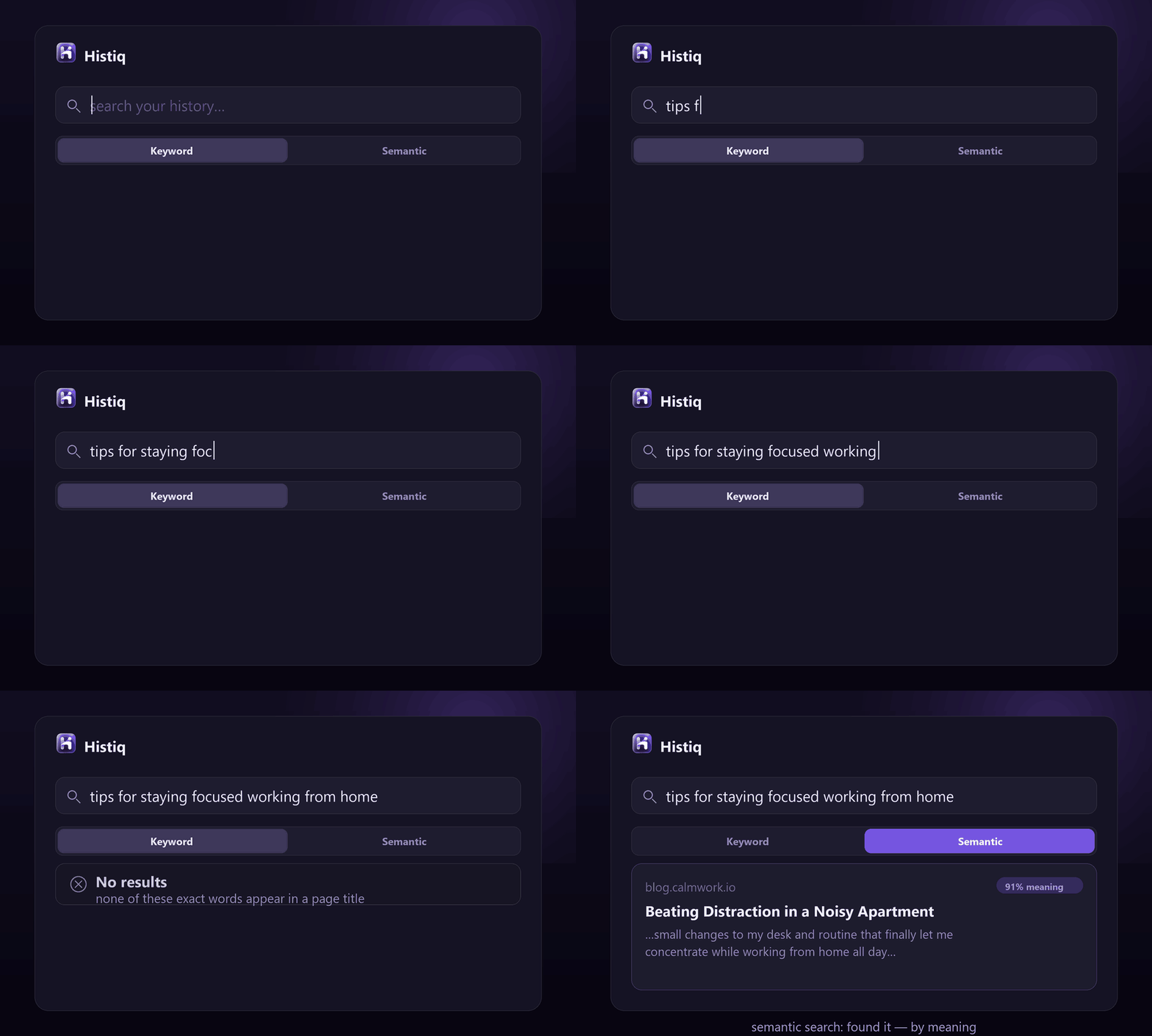
Its weakness is rigidity. If the page you’re looking for is titled “Beating Distraction in a Noisy Apartment,” a keyword search for “working from home focus” finds nothing — even though it’s exactly the article you want. No shared words, no match. This is called the vocabulary mismatch problem, and it’s why your browser’s history search feels broken so often.
What semantic search does
Semantic search matches on meaning instead of exact words. It converts your query and each document into a list of numbers (an embedding) that captures what the text is about, then finds the documents whose meaning is closest to your query — even if they share no words at all.
So “working from home focus” lands right on “Beating Distraction in a Noisy Apartment,” because the model understands the two describe the same idea. Synonyms, paraphrases, and vague from-memory descriptions all work. The trade-off: it’s a little heavier to compute, and for an exact phrase you know verbatim, plain keyword matching is faster and more precise.
Semantic search vs keyword search: 5 key differences
So which one is better?
Neither — and that’s the point. The right answer is a hybrid: try exact keyword matching first (fast and precise), and if that returns nothing useful, fall back to semantic search on meaning. You get the speed of keywords and the recall of semantics.
How this plays out in your browser history
This is exactly the gap in browser history search: it’s pure keyword, over titles and URLs only. That’s why remembering what a page was about but not its title leaves you stuck (more on that in searching Chrome history by content).
Histiq uses the hybrid approach on the pages and PDFs you read: exact keyword search first, then a semantic fallback that runs a small embedding model (~22 MB) on your device. So when the exact words don’t line up, it still finds the page by meaning — and nothing is uploaded to do it.
Semantic search vs keyword search: the short version
- Keyword search matches exact words — fast and precise, but blind to synonyms and paraphrase.
- Semantic search matches meaning — it finds the right page even with no shared words.
- The best tools do both: keyword first, semantic fallback. That’s how search should feel.
Want semantic search over your own browsing history? Start a 14-day free trial of Histiq — hybrid keyword + semantic search, running entirely on your device.
Install Histiq for Chrome & Edge →